
Introducing our Whole Home WiFi System
Total WiFi for total peace of mind

Wessex Internet Total WiFi
Our whole home WiFi gives you reliable wifi coverage in every room, removing frustrating dead spots and providing a stable connection for the whole family. From just £4.50 per month*, you can enjoy a strong wifi signal, fast performance, and a simple, easy setup designed to work seamlessly with your fibre broadband service.
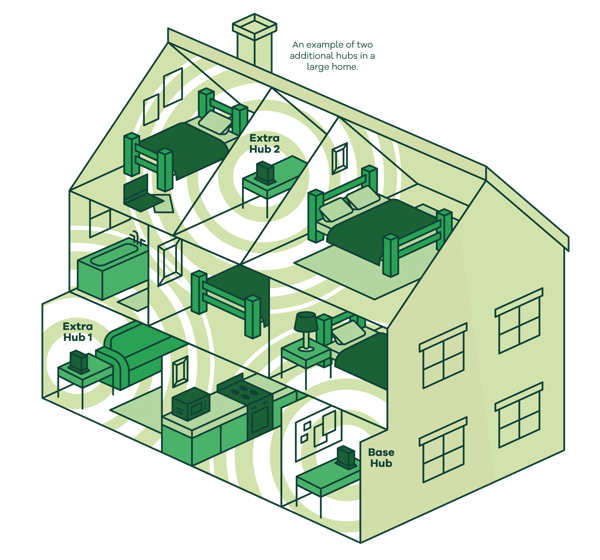
How Whole Home WiFi Works
Our Whole Home WiFi system, Total WiFi creates a single, powerful home network that reaches every corner of your property. Instead of relying on a traditional WiFi extender, it uses advanced technology to deliver consistent WiFi coverage, a stronger signal and reliable speed throughout each room in your house.
Banish WiFi dead zones in your home
With advanced tri-band technology, Total WiFi offers fast speeds and consistently strong WiFi coverage, reaching every corner of your home for a smooth online experience.
Hassle free control and parental restrictions
Keep your kids safe with URL filtering and restrict time online with scheduling.
Always up-to-date protection
Free network security makes sure your privacy on connected devices is protected with a strong WiFi signal and reliable coverage across your home.

Set up is simple
Whole Home WiFi setup is quick and fully guided. One of our team members will walk you through the easy step-by-step process, and your subscription ensures we’re always here to help if any WiFi signal or speed issues arise.
For more information on our Total WiFi service call our sales team on 0333 240 7997.
*Additional hubs may be required for large houses, or properties with thick walls. For full terms and conditions of Total WiFi click here.
Whole Home WiFi FAQs
-
Where should I place my WiFi hub for the best signal?
For strong, reliable performance, your hub should be placed in a central, open area of your home, ideally at eye level or higher. Avoid hiding it behind furniture or placing it next to electronics like TVs, cordless phones or printers, as these can interfere with your Wi-Fi signal. Good placement alone solves many WiFi problems.
-
Why does my WiFi drop when certain appliances are being used?
Microwaves, older TVs, wireless speakers and Bluetooth devices can all create interference, especially on the 2.4GHz WiFi band. If your connection drops at specific times or when certain devices switch on, try moving to the 5GHz band on your hub or device. This often reduces interference and stabilises your signal.
-
What can I do if I live in a countryside home with thick stone walls?
Many rural properties in Dorset, Somerset and surrounding areas have solid walls that naturally block Wi-Fi signal. Start by placing your hub in a central, elevated position. If dead zones remain, a Whole Home WiFi system can help your signal travel through challenging building layouts more effectively.
